Identity systems workload
Microsoft Active Directory
Active Directory (AD) controls user access to network resources, making it a prime target for attackers. Safeguard your AD from deletion, corruption, and attacks.
demo Video
Accelerate and automate Active Directory forest recovery
See how Commvault enables the rapid and automated recovery of the AD forest after corruption or attack.

The challenge
Identity is the foundation of your systems
When Active Directory goes offline, your business operations can come to a halt. Are you prepared for the worst-case scenario? Commvault® Cloud offers rapid, automated recovery of AD, enabling you to restore identity services to a trusted state quickly and resume operations after an attack or outage.
9 in 10
estimated cyberattacks involve Active Directory
$730,000
the potential financial loss from AD outages
Days to weeks
The time it takes to recover Active Directory after an attack using manual recovery methods.
¹ Sheridan, K. (2021, May 3). Researchers Explore Active Directory Attack Vectors. Dark Reading. https://www.darkreading.com/vulnerabilities-threats/researchers-explore-active-directory-attack-vectors
² Forbes, Understanding The Implications Of Active Directory Outages—And How To Fight Back, September 2024
Accelerate AD recovery
Reduce the time to recover Active Directory after a cyberattack
Manually recovering Active Directory can take days to weeks. Automate and accelerate the AD recovery process to reduce the risk of error and recovery time.

Automated AD forest recovery
Automate the full AD forest recovery process to minimize downtime and maintain continuous business across the enterprise.
Automated recovery runbooks
Streamlines the multi-step process required for Active Directory forest recovery, including all the complex hygiene tasks required to verify consistency in the recovered AD.
Visual AD topology views
Visual topology views of your AD environment enable simple and rapid identification of which domain controllers to restore first and how they should be recovered to accelerate availability of identity services.
Prescriptive runbook views
Step-by-step views of the recovery process offer complete visibility into your progress and how long it will take to get your Active Directory back online.
AD recovery testing
Practice your AD disaster and cyber recovery plans regularly in a non-production lab environment during the good times to prepare for the bad times.
Find identity risks and respond quickly
Granularity that enables you to view what’s changed in your environment and revert those changes as efficiently as possible to get your business back online fast.

Single-solution identity protection
Unified protection of critical AD and Entra ID objects and attributes, including group policy objects, users, groups, and all their relationships.
Interactive comparison reporting
Compare all changes in the AD domain between two points in time, quickly identify the data that needs to be recovered or reverted, and restore it quickly, directly from the report.
Object and attribute-level recovery
Fast, granular recovery allows administrators to quickly recover only the missing, damaged, or misconfigured object attributes, helping to get business systems or users back online quickly.
AI Recovery Solutions
Related to this workload
Recover Active Directory with the AI recovery solutions built for it.


CyberRecover
Clean, isolated recovery when trust in the production environment is gone.
Explore solution
Our Reach
Supporting more than 100,000 companies







“We used to manually engineer redundancy to avoid data loss. Commvault provides the needed flexibility and granularity for fast restores.”

“Data is the lifeblood of the business. You can’t underestimate the benefit of a reliable, timely data backup and recovery.”

“Commvault gives us confidence that our data is safe, and our important services can be up and running quickly.”
Analyst Report
Gartner® Magic Quadrant™
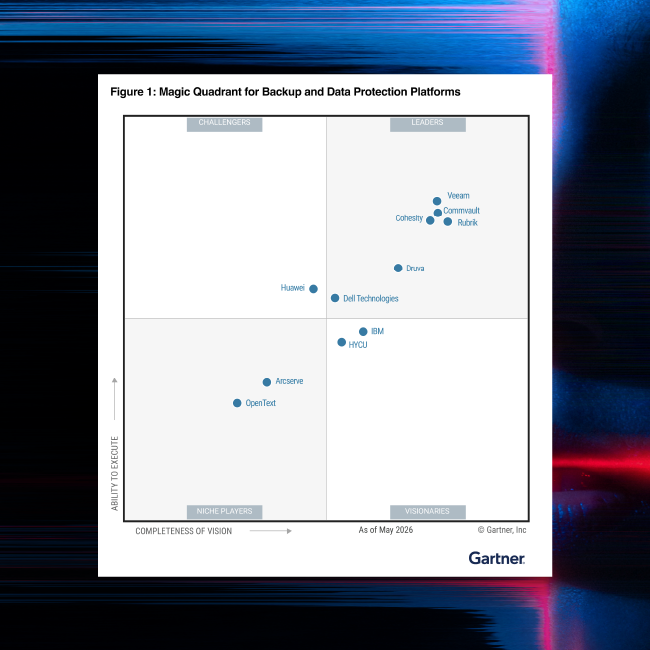
For the 15th time in a row, Commvault has been named a Leader in the Gartner® Magic Quadrant™ for Backup and Data Protection Platforms.

Active Directory protection

Protect Active Directory from data loss threats

Identity Resilience: Why Protecting Credentials Isn't Enough
Frequently Asked Questions
What is Active Directory forest recovery?
Active Directory forest recovery is the process of recovering the entire AD environment to a functional state after a critical failure or a cyberattack, like ransomware. It involves rebuilding the domains, domain controllers, and reinstating forest-wide services.
With ransomware increasingly targeting critical identity infrastructure, having a well-documented and frequently tested recovery plan to restore and rebuild your entire AD environment to a pre-attack state is essential for maintaining continuous business.
Why do I need a solution for Active Directory forest recovery? Can’t I manually recover the AD forest using Microsoft’s guidance?
Active Directory forest recovery is a complex, time-consuming, and error-prone process, especially with manual methods. Microsoft’s Active Directory Forest Recovery Guide provides prescriptive guidance for rebuilding an entire AD forest, but it’s intricate and involved. Depending on the complexity of your AD architecture, the process can involve 50 to 100 or more tasks, each of which must be executed in a specific order during the recovery.
Relying on a manual disaster or cyber recovery plan, along with out-of-the-box Microsoft tools, could mean it takes days to restore an entire AD forest. Commvault automates the full forest recovery process– following the Microsoft recommended approach – including critical hygiene tasks such as seizing FSMO roles and adjusting the RID pool, reducing the risk of human error and enabling you to recover in a fraction of the time.
Are VM snapshots sufficient for AD backup?
VM snapshots aren’t enough. Due to the multi-master nature of Active Directory, it’s not possible to bring back domain controllers at scale using VM snapshots. Dozens of intricate hygiene steps need to be performed on the recovered domain controller and within AD itself at very specific points throughout the forest recovery. If these steps aren’t followed correctly, you risk introducing new corruption or inconsistencies in the recovered environment that could be very difficult, if not impossible, to resolve.
Can Commvault support protection and recovery of large AD environments?
Commvault Backup & Recovery for Active Directory is designed to manage complex Active Directory setups, including multiple domains and geographically dispersed environments.
When disaster strikes and your business is offline, it’s critical to be able to quickly recovery as much AD infrastructure as possible. During a forest recovery, Commvault enables automated restoration of many domain controllers from each domain, which significantly speeds up the recovery process. Commvault runbooks also automate the promotion of additional DCs to reestablish the complete infrastructure that was in place before the cyber incident.