Clumio Cloud Recover Capability
Cloud-scale Rollback
Return billions of objects to the moment before the mistake, in place.

See it work
Roll back a bucket in minutes
Watch a point-in-time rollback across an S3 bucket, run from the console and again from the API.

Why it matters
Capability Benefits
Recover the way cloud developers need it: fast, precise, and in place.

Recover at cloud scale
Objects return to a chosen version where they already sit; nothing is copied back from a vault.

Object, prefix, partition or bucket
You roll back one object, one prefix, one DynamoDB partition, or a full bucket.

Pick the point before the damage
Choose the exact point before the bad deploy, the lifecycle rule, or the attack.

No extra copies to store
Rollback works from S3 Versioning, so resilience does not mean a second copy of the bucket.

Billions of objects, one job
Automation does what would otherwise require extensive manual effort: version by version across an entire bucket.

S3, DynamoDB and Iceberg tables
The same rollback model for object storage, NoSQL tables and lakehouse tables.
Analyst recognition
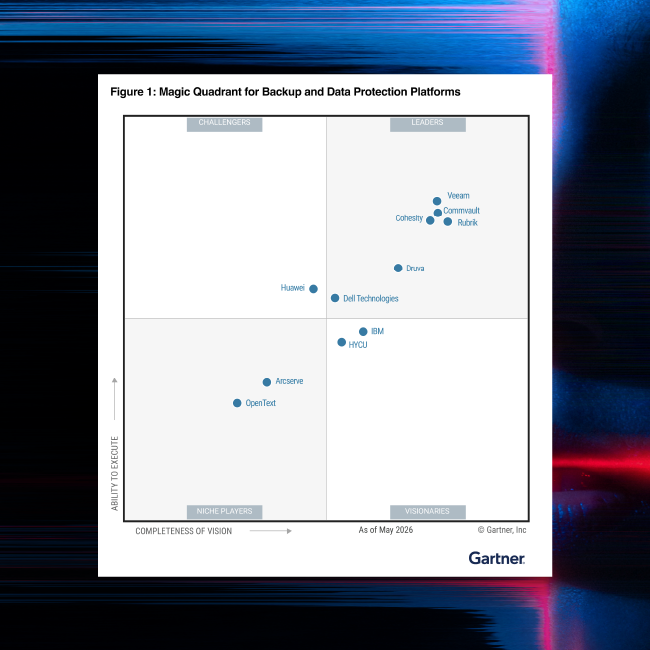
2026 Gartner® Magic Quadrant™ report
Commvault named a Leader in the Gartner® Magic Quadrant™ for Backup and Data Protection Platforms for the 15th consecutive time and ranked #1 in 5 of 6 Use Cases in the Critical Capabilities.
How it works
Capability Features
Point-in-time rollback for Amazon S3
Revert objects to a specific version at a specific time, across an entire bucket.
In-place restore for DynamoDB
Return a table or a partition to a prior state, precise to the second, with no new table.
Iceberg-aware recovery
Restore tables with their metadata and manifest files, so no manual rewiring.

Related to this capability
ai recovery Solution
Clumio CloudRecover
Recovery built for the cloud. Proven at scale. Ready for AI.

Threat and Ransomware Detection
One verdict on every backup, with the evidence behind it.
Learn more
Air-gapped, immutable protection
Every copy isolated, immutable, and stored outside your production account.
Learn more
Built for Cloud Developers
Protection declared in code, driven by API, operable by AI agents.
Learn moreOUR REACH
Commvault supports more than 100,000 companies
Teams running some of the largest cloud estates trust CloudRecover to get them back.






“With Clumio CloudRecover Instant Access, if there were to be data loss, we could have our application back up in less than an hour. That's a game changer. Before, it would have taken us days or weeks to restore our vast repositories of unstructured data.”
“Recovery speed is one of the areas where we saw the biggest improvement… With Clumio CloudRecover, the Instant Access feature lets us mount backups in minutes without waiting for full restores.”
Frequently Asked Questions
What is in-place rollback?
In-place rollback returns cloud data to a chosen version at a chosen point in time without copying it back from a vault. For Amazon S3 it works from object versioning; for DynamoDB it restores a table or partition to a prior state; for Apache Iceberg it restores the table with its metadata intact. Billions of objects, one operation.
Can I just use S3 Versioning to recover my objects?
Amazon S3 Versioning lets you return an object to an earlier version, with manual recovery performed object by object. Modern applications and AI workloads need that across entire buckets of millions or billions of objects, impractical by hand. In-place rollback automates it, reverting objects to a chosen version and point in time at cloud scale.
Does rollback require S3 Versioning to be enabled?
Yes. Rollback for Amazon S3 uses the versions S3 already keeps, which is why it needs no additional vault copies. Versioning is a cloud best practice most organizations already enable; CloudRecover makes those versions usable at scale.
How far back can I roll back?
As far as the versions and recovery points you retain. Rollback uses the versions kept under your S3 lifecycle settings and, for DynamoDB and Iceberg, the recovery points held in your CloudRecover policy, so retention is yours to set.
Does in-place rollback work for DynamoDB and Iceberg tables?
Yes. DynamoDB tables and partitions can be returned to a prior state, precise to the second, without creating a new table. Apache Iceberg tables on AWS, including S3 Tables, are restored with their metadata and manifests intact, so there is no manual rebuild of the table structure.
See it with your data
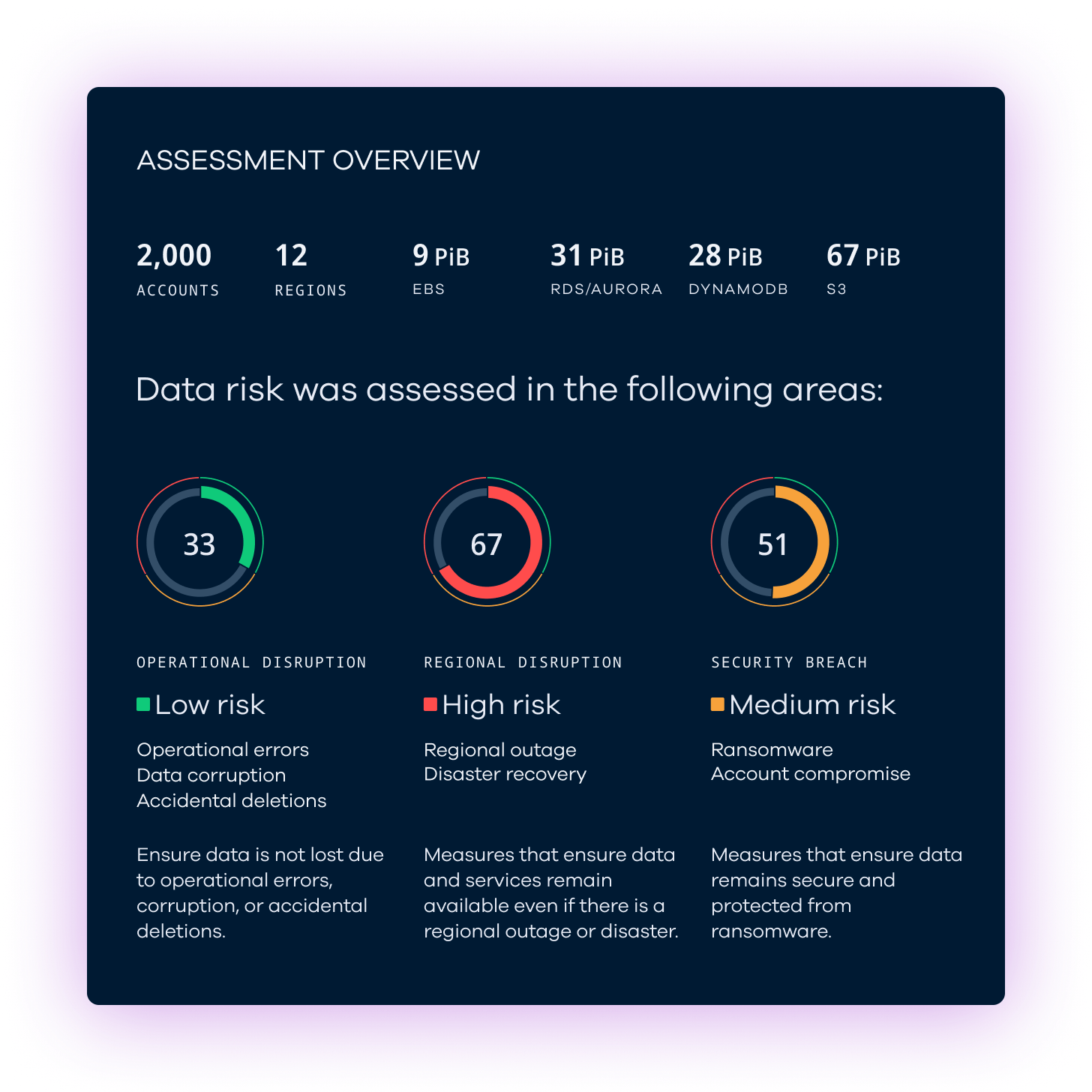
Clumio CloudRecover Data Risk Assessment
CloudRecover helps you identify cloud data recovery and resilience gaps. Get a CloudRecover Data Risk Assessment to uncover risks in your cloud environment and gain a roadmap to stronger resilience.