SaaS Recover Capability
Backup & Recovery for Microsoft Power Platform
SaaS backup and recovery for Power BI data security

Demo video
See SaaS recovery
Watch Microsoft SaaS backup and recovery in action for stronger data security.

key benefits
Capability Benefits
SaaSRecoverhelps you recover Power BI reports, workspaces, and folders.

Recover the right content
Faster restore
Restore specific reports or folders without replacing an entire workspace.

Strengthen data security
Isolated copies
Keep backup data separate from production to support trusted recovery.

Reduce manual effort
Policy driven
Automate protection policies instead of relying on manual exports.

Support compliance needs
Long retention
Retain backup copies up to 10 years for governance needs.

Improve recovery visibility
Centralized control
Monitor coverage, status, and failures from one management view.

Protect more with less
Unified coverage
Cover Power BI alongside Microsoft 365, Dynamics 365, VMs, and endpoints.
How it works
Capability Features
Automated Power BI backup
Protect workspaces, reports, and folder structures with policy-driven backups.
Granular Power BI recovery
Restore reports or full workspaces to their original location.
Backup health reporting
See backed up workspaces, missed items, and failure reasons centrally.

Analyst Report
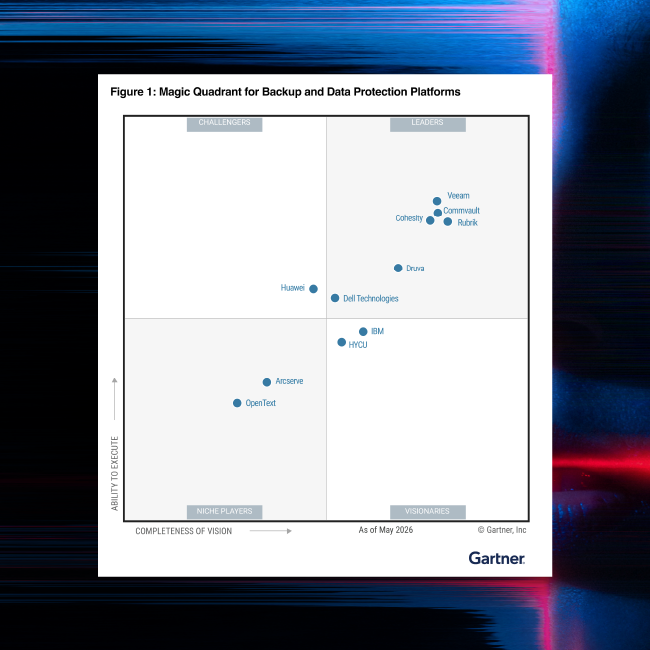
Gartner® Magic Quadrant™
Commvault named a Leader in the Gartner® Magic Quadrant™ for Backup and Data Protection Platforms for the 15th consecutive time and ranked #1 in 5 of 6 Use Cases in the Critical Capabilities.
Our Reach
Supporting more than 100,000 companies
Security leaders trust Commvault to strengthen recovery readiness and cyber resilience.







“We used to manually engineer redundancy to avoid data loss. Commvault provides the needed flexibility and granularity for fast restores.”

“We love the simplicity of the Commvault dashboard. With just a few clicks, we can restore a virtual machine or backups after an attack.”

“Commvault Cloud gave us a way to dramatically lower those costs and keep them predictable, while simultaneously providing us with the data resilience needed.”
Workloads
Explore SaaS recovery
See how SaaS backup and recovery helps restore deleted or corrupted data.

Related to this Capability
Explore solution, documentation, and product resources for Power Platform protection.
AI Recovery solution
SaaSRecover
Recover critical SaaS application data with one policy across workloads.

Power Platform datasheet
Review supported capabilities, retention, recovery, and storage details.
Read datasheet
Frequently Asked Questions
What is Power Platform data protection?
Power Platform data protection is dedicated SaaS backup and recovery for critical Power Platform data. In Commvault’s current public offering, that means automated protection and granular recovery for Power BI workspaces, reports, and folder structures with isolated backup copies and centralized management.
Why use SaaS backup and recovery?
SaaS backup and recovery adds isolated copies, policy-driven protection, and more recovery control than native capabilities alone. That helps teams restore the right Power BI content faster, reduce manual work, and strengthen data security after deletion, corruption, or malicious activity.
Why do I need dedicated Power Platform data protection?
Microsoft keeps Power Platform available, but protecting and recovering your data is your responsibility.SaaSRecoveradds isolated copies, policy-driven backups, and granular restore that built-in tools alone may not provide.
What Power BI content is protected?
Commvault protects Power BI workspaces, reports, and folder structures. Newly discovered content is automatically included in future backups. Public documentation also notes current exclusions, including personal workspaces, unpublished Power BI Desktop reports, non-.pbix files, and certain large .pbix restore limits.
How do teams monitor backup health?
Teams can use the Power Platform Backup Health Report to see which workspaces were backed up, which were not backed up, and why failures occurred. That centralized visibility helps administrators investigate issues and maintain recovery readiness with less manual checking.
What does Backup & Recovery for Power Platform support today?
Current public Commvault pages, trial details, datasheet language, and product documentation support Power BI protection today. That includes workspaces, reports, and folders. Public-facing materials still describe Power Apps and Power Automate support as planned or coming soon.
See it in action
Schedule a free demo
See Power BI backup, recovery, and data security in action.
-
Hands-on tour
-
30 minute consultation
-
Get faster and cleaner data recovery at scale